


How to update or create a contract from a draft contract on FPT.eContract
- 03/03/2023
- [post-views]
Draft contract is electronic contracts in the process of creation but not yet completed or contracts copied from contracts which are in progress, canceled, rejected or overdue.
To update and create an electronic contract from a draft contract on FPT.eContract, users can follow the following 2 steps:
1. Update a contract:
- Select “Document” -> select “Contract” (on the left of the menu) -> select “Draft”.
- At the Draft screen, select the contract needed to edit. Click on the pencil icon to update the contract.
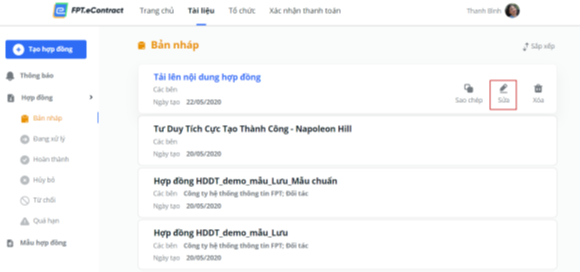
- The system displays the list of previously uploaded files
2. Upload a contract to update:
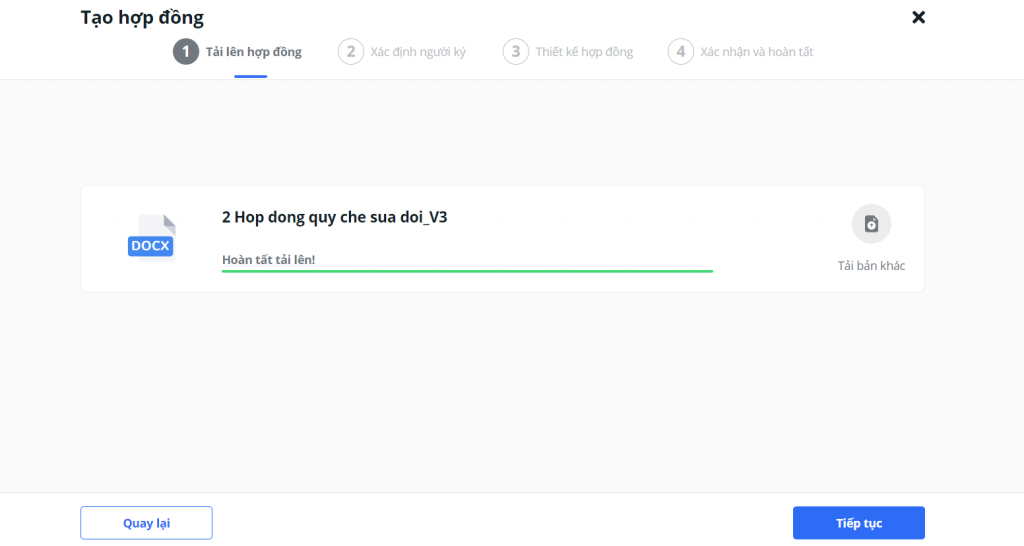
Note: Users can refer to the detailed flow instructions at “Create a contract”
Thus, with two steps above, users can immediately have an e-contract and ready to design the signing process. As long as one party signs a contract using FPT.eContract, the other party who does not have FPT.eContract account can still receive notifications via email or text message to log in to the platform to sign.
3. Remove a contract
Regardings the old contracts that need to be deleted, how should we handle it? To delete a draft contract, users will follow the following steps:
- Access Contract List
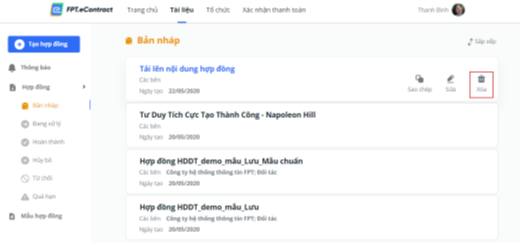
- Select “Document”, select the item “Contract” (on the left of the menu), select the item “Draft”.
- At the “Draft” screen. Select the contract you wants to delete. Click on the trash bin icon to delete the contract. The system will ask you for confirmation of contract deletion.
- To confirm deletion, select “Delete”, this contract is permanently deleted from the system. To cancel the process, select “No”.
For more detailed information and consultation on FPT.eContract, contact us via:
FPT Information System Company Limited – FPT Information System
- Address: 22nd floor, Keangnam Landmark 72 Tower, E6 Pham Hung, Hanoi
- Hotline: 0934.453.466 – 0934.583.499 VND
- Website: https://econtract.fpt.com.vn

Related news
E-contract and its characteristics
Tools to make e-health care easier
[BY FPT IS] WEBINAR: ELECTRONIC LABOR CONTRACT BETWEEN BUSINESS & EMPLOYEES: FROM LEGAL TO IMPLEMENTATION